




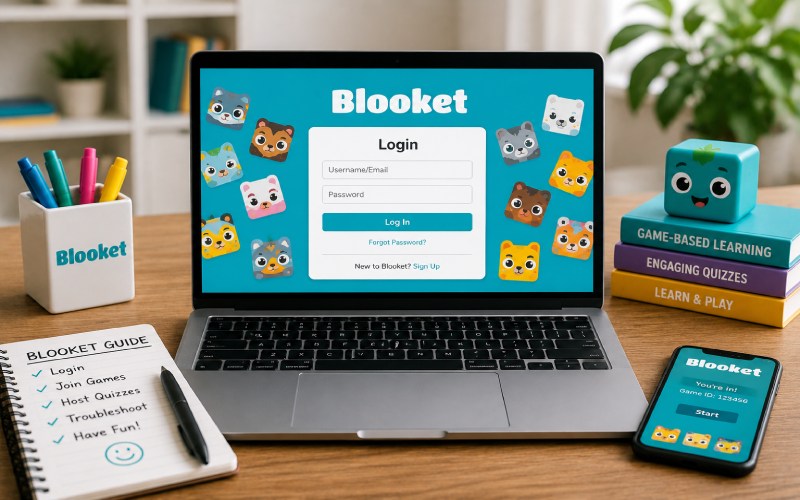
Blooket is an online learning platform that is based on gaming activities between teachers and students. Blooket promotes new-age learning with modern tools that ease learning and understanding by combining quizzes with interactive game modes. This results in transforming a traditional classroom into a fun and engaging experience. If you also want to use this platform, then understanding how to log in, join games, host quizzes, and more is important, which we will discuss in this article, so keep reading.
What Is Blooket?
Blooket is a useful online education platform that allows teachers to create or use pre-developed quizzes and make learning interesting with various game modes. It facilitates their learning by providing them with an interactive environment, which makes learning overall enjoyable and competitive.
Some of its most popular features include:
-
Live classroom games
-
Homework assignments
-
Custom question sets
-
Multiple game modes
-
Progress tracking
-
Collectible “Blooks”
How to Log In to Blooket
You can easily log in to your account by following these simple steps:
-
Visit the official Blooket website.
-
Click Log In.
-
Enter your email address and password, or choose Sign in with Google if available.
-
Select Let’s Go to access your dashboard.
Logging in is required for creating question sets, hosting games, managing your profile, and viewing your progress.
How to Create a Blooket Account
If you want to create a Blooket account, you should follow these simple steps:
-
Select Sign Up.
-
Choose whether you’re a Teacher or Student.
-
Enter your date of birth.
-
Sign up using Google or email.
-
Verify your email if required.
-
Create a secure password.
However, it is not mandatory to log in before joining all games. Students can also join as a guest.
How Students Join a Game
If you are new to the platform and unaware of how to join games, here is a simple guide on joining games:
-
Visit play.blooket.com.
-
Enter the game code provided by the teacher.
-
Scan a QR code if available.
-
Use a direct join link.
-
Choose a nickname and begin playing.
How Teachers Host a Game
For hosting a game, teachers are required to log in:
The typical process includes:
-
Selecting or creating a question set.
-
Choosing a game mode.
-
Adjusting game settings.
-
Starting the session.
-
Sharing the game code with students.
Giving gaming assignments as homework for students can be an interactive way of promoting learning.
Common Login Problems
Mostly, login problems can be resolved quickly, such as:
-
Incorrect email or password
-
Forgotten password
-
Browser cache issues
-
Wrong Google account
-
Email verification not completed
In case you want to reset your password, you can use the ” Forgot Password ” option.
Benefits of Having a Blooket Account
Although it is mandatory to have an account for joining many games, creating an account provides additional benefits, such as:
-
Saving progress
-
Collecting Blooks
-
Tracking statistics
-
Hosting games
-
Creating custom quizzes
-
Managing question sets
Tips for a Better Blooket Experience
To get the most out of the platform:
-
Use a secure password.
-
Log in to Google if your school supports it.
-
Keep your browser updated.
-
Create memorable question sets.
-
Try different game modes.
-
Regularly review your saved content.
By following these simple tips, you can improve your Blooket using experience significantly.
Why Blooket Is So Popular
Blooket is an amazing learning platform that blends education with gameplay. It is primarily popular due to factors like:
-
Interactive learning
-
Competitive game modes
-
Easy classroom integration
-
Homework support
-
Student engagement
-
Regular updates
Frequently Asked Questions (FAQs)
Do I Need an Account to Join a Blooket Game?
Not necessarily, you can join a live game using a game code without creating an account. However, if you create an account, you may get additional benefits.
Can I Log in Using My Google Account?
Yes, many platforms, including Blooket, allow creating an account using a Google account.
What Can Teachers Do After Logging In?
Teachers can do multiple things after logging in, such as creating quizzes, hosting live games, assigning homework, monitoring student programs, and doing many more things.
Conclusion
Blooket is an online learning platform. It links education with games, which makes learning interesting. In this article, we discussed Blooket in detail, shared relevant information with you, and also discussed how to resolve common problems that you may face while using this platform. In the end, we hope that you like reading this post and find it informative. If so, then do share this post with others as well.