




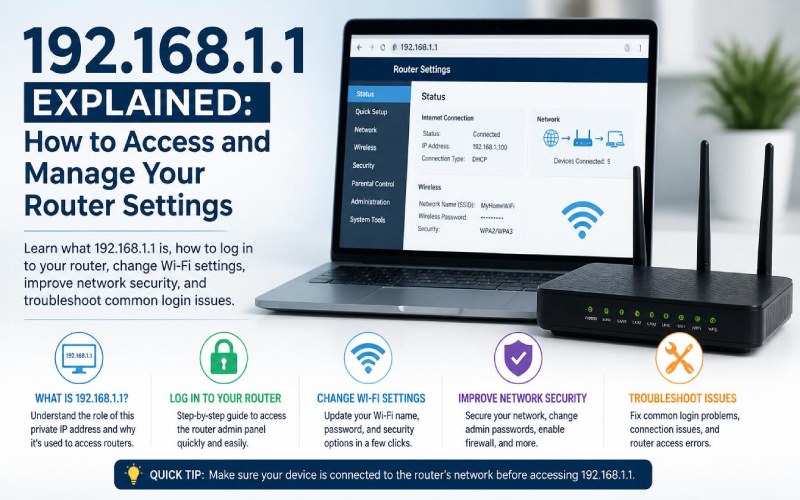
192.168.1.1 is a private IP address commonly used as the default gateway for many home and small websites. If you are a frequent Wi-Fi user and have even needed to change your password, improve your network security, or troubleshoot any internet problem, then you must have seen this IP address. You can use this address through a web browser to access your router’s administration panel and optimize network settings as per your needs. That’s why it is important to understand what 192.168.1.1 is and how you use it to control your home network.
What Is 192.168.1.1?
It is a private IPv4 address typically assigned as the default gateway for many routers. It serves as the connection point between your local network and the internet. This IP address is not brand-specific, and you may find it on devices from brands like:
- TP-Link
- D-Link
- NETGEAR
- ASUS
- Linksys
- Tenda
What Can You Do Through 192.168.1.1?
It allows you to access your router’s admin panel through which you can modify your network settings, such as:
- Change the Wi-Fi name (SSID)
- Update the Wi-Fi password
- Change the administrator password
- View connected devices
- Configure parental controls
- Update router firmware
- Restart or reboot the router
- Adjust wireless settings
- Configure guest networks
- Set up port forwarding
How to Access 192.168.1.1
To access 192.168.1.1, you should follow these simple steps:
- Connect your device to the router using Wi-Fi or an Ethernet cable.
- Open a web browser.
- Type http://192.168.1.1 into the address bar.
- Press Enter.
- Enter your router’s administrator username and password.
- Access the router’s management dashboard.
How to Find Your Router’s Gateway Address
192.168.1.1 is a common IP address; however, it doesn’t mean that your router’s IP address can’t be anything else. It can be different, and to find it, you should follow these steps:
On Windows
- Open Command Prompt.
- Type: ipconfig
- Locate the Default Gateway entry.
On macOS
- Open System Settings or System Preferences.
- Navigate to your network settings.
- View your active network details.
- Locate the router or gateway address.
On Android or iPhone
You can check it in the Wi-Fi network settings under advanced or network details.
Common Login Problems
Facing problems during login is completely normal. Here are some of the most common issues faced by users:
- Incorrect IP address
- Wrong administrator username or password
- Browser cache problems
- Network connection issues
- Router configuration changes
Default Router Credentials
Generally, routers come with default login credentials.
Examples include:
- Username: admin
- Password: admin
- Username: admin
- Password: password
You should change default credentials immediately for security reasons.
Improving Router Security
For improving your router’s security, you should:
- Change the default administrator password.
- Use a strong Wi-Fi password.
- Enable WPA2 or WPA3 encryption if supported.
- Keep firmware updated.
- Disable remote administration unless necessary.
- Review connected devices regularly.
When Should You Reset Your Router?
You should consider resetting your router settings if:
- You forgot the administrator password.
- The router is malfunctioning.
- Configuration settings have become corrupted.
- You plan to sell or give away the router.
Remember, it will erase all your customized settings, and you will need to set it up again.
Common Mistakes to Avoid
Here are some common mistakes to avoid for an ideal experience:
- Sharing your administrator password.
- Leaving default credentials unchanged.
- Ignoring firmware updates.
- Disabling security features unnecessarily.
- Resetting the router without backing up important settings when possible.
Frequently Asked Questions (FAQs)
What is 192.168.1.1?
192.168.1.1 is a commonly used IP address as the default gateway for many home and office routers.
Why Can’t I Access 192.168.1.1?
It may be because your router uses a different gateway address, or you are using the wrong credentials, or other similar reasons.
Is it Safe to Log Into My Router Through 192.168.1.1?
Yes, it is considered completely safe and a standard way to manage network settings. However, you should check your default gateway address before using 192.168.1.1.
Conclusion
192.168.1.1 is a commonly used IPv4 address as the default gateway for home and small office routers. You can manage your network’s administration using it, change its network settings, and optimize its performance according to your requirements. In this article, we discussed this topic in detail and shared relevant information with you. In the end, we hope that you like reading this post and will share it with others as well.